The work that makes a proposal persuasive starts before the first paragraph. Your team needs a clear understanding of the customer’s problem and a credible approach to solving it. The response then has to make that case within the solicitation’s requirements and page limits.
We built pWin.ai’s AI proposal generation around those decisions. Through our exclusive partnership with Shipley Associates, we’ve brought Shipley best practices into the workflow, from solicitation analysis through drafting and compliance review.
With pWin.ai, your team follows a process built on decades of industry best practices and choose when to review and refine the plan:
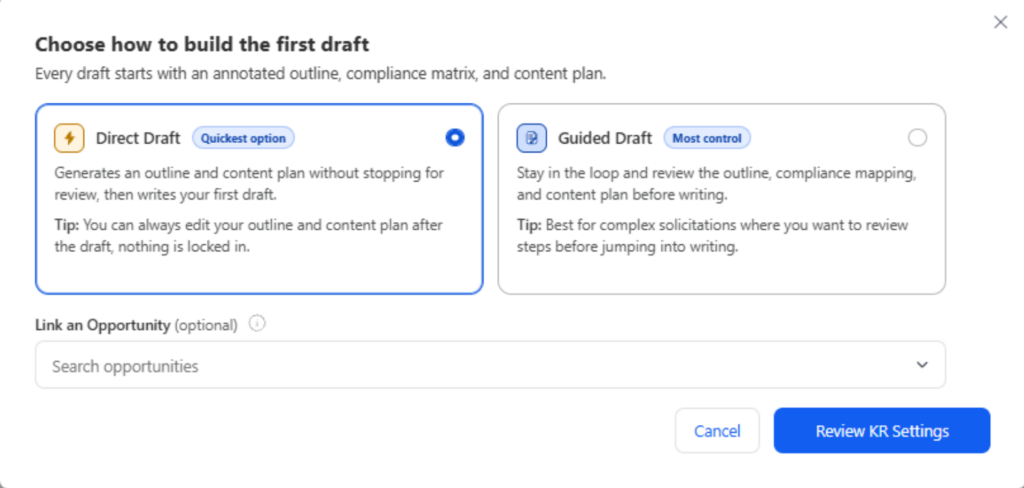
- Guided Draft pauses after each planning stage so your team can review and refine the output before the next stage begins. You review and shape the proposal plan before pWin.ai writes the response.
- Direct Draft automatically works through the planning stages, then writes a complete first draft without pausing for review between stages. Your team reviews the draft and its supporting plan as sections become available.
Both keep the outline, compliance mappings, and Content Plan available to edit. When your thinking changes, you can update the inputs and regenerate the affected sections.
In both modes, your team remains in control by validating the proposed solution and approving the decisions reflected in the final response.
Build the proposal plan from the solicitation
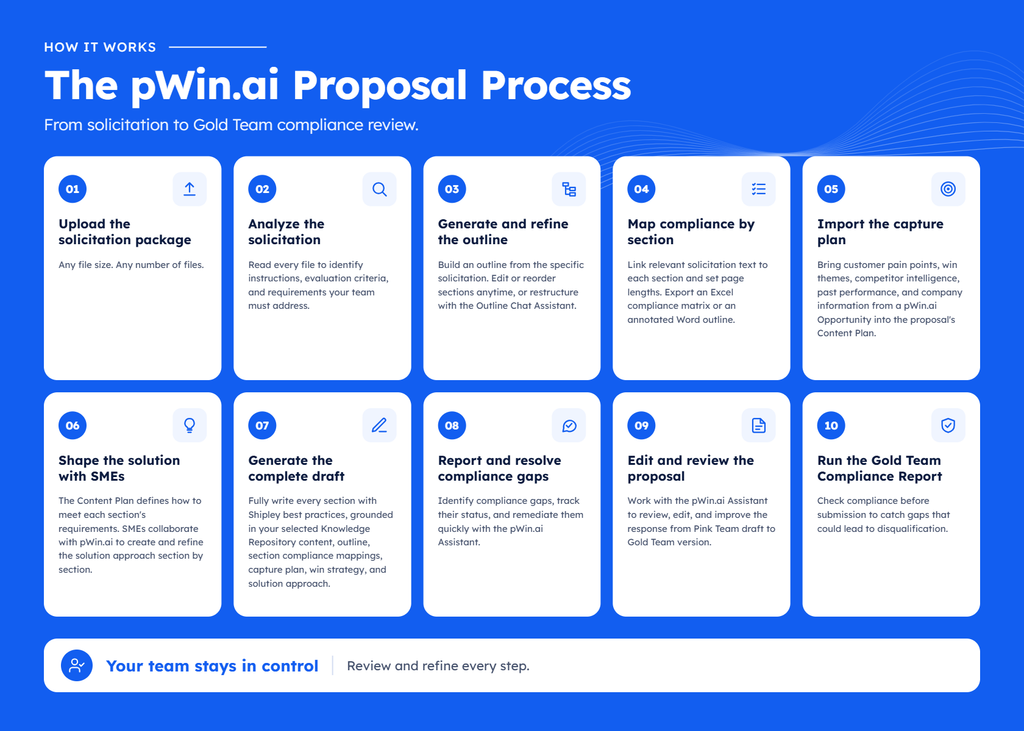
A strong proposal must answer the specific RFP in front of you. pWin.ai reads the solicitation package, including its attachments, to identify the instructions, evaluation criteria, and requirements your response needs to address.
That analysis shapes the outline. pWin.ai maps the relevant solicitation text to each section and sets page allocations. Your team can inspect the mappings, revise the structure, and decide where the response needs more attention. You can also export an Excel compliance matrix or an annotated Word outline for reviewers.
The Content Plan brings your capture work into that structure. When you link a pWin.ai Opportunity, customer pain points, win themes, and competitor intelligence carry into the proposal. Your selected Knowledge Repository supplies source material such as past proposals, past performance, and company information.
Subject matter experts help turn that information into a solution approach. They can work collaboratively with the pWin.ai Assistant to develop and refine how your team will meet each section’s requirements. Those decisions give the draft something specific to explain and support.
The full workflow continues through proposal reviews, compliance assessments, and a final Gold Team compliance check.
Faster proposal generation without shortcuts
Some teams find it easier to review and iterate on a proposal approach once they can read it fully written. Or their time is limited due to a quick turn solicitation. pWin.ai’s Direct Draft gives teams a faster option without sacrificing the same critical planning foundation.
Direct Draft is pWin.ai’s approach to accelerating the work while retaining the planning stages. It generates the outline, compliance mappings, and Content Plan before writing, so your team can review and refine the plan alongside the draft as sections become available. This supports a tailored proposal process to the time available like Shipley’s rapid-response guidance.
To get started, upload the solicitation package, select the Knowledge Repository content pWin.ai should use, and link the Opportunity if you have a capture plan. Then choose Direct Draft.
pWin.ai moves through solicitation analysis, outline generation, compliance mappings, and the Content Plan before writing the proposal. Each stage supplies the inputs for the next, so the draft reflects the plan developed along the way.
Sections begin appearing in about 30 to 45 minutes. You can review them as they arrive, and pWin.ai emails you when the full draft is ready.
As you read, you can inspect the decisions behind a section. If the outline needs to change, edit it. If the solution needs more detail, work with an SME to refine the Content Plan. Then regenerate the affected sections using those updated inputs.
Choose the approach that fits your team
Guided Draft suits teams that want to resolve planning decisions before writing begins. Direct Draft suits teams that find it easier to evaluate an approach once they can read it in a response. The pursuit schedule and your review process can help you choose.
| Direct Draft | Guided Draft | |
| When you review | Start with the generated draft, then inspect and refine the planning behind it. | Review each stage before the next begins. |
| A good fit | A short turnaround, a first look at a pursuit, or a team that thinks best against written content. | A pursuit where the team wants to settle the outline, mappings, and solution approach before drafting. |
| Pace to first draft | Moves through the planning and writing stages without review pauses. | Moves at the pace of your team’s review cycles. |
Both approaches use the same proposal workflow and give your team access to the same review and refinement tools. You can switch between Direct Draft and Guided Draft at any time during a pursuit, including when processing an amendment.
Example: An RFP with 10 days to respond
Consider an illustrative pursuit: an agency releases an RFP with 12 files, including the instructions, evaluation criteria, performance work statement, and attachments. Your team has 10 days to submit a response with a 30-page technical volume, 10-page management volume, and a pricing volume.
The proposal manager uploads the package, selects relevant Knowledge Repository content, links the capture Opportunity, and chooses Direct Draft. As sections arrive, reviewers can read the emerging response and inspect its outline, mappings, and Content Plan.
After reviewing the first draft, the capture lead identifies a customer concern that needs more attention in the transition approach. The team expands that section from six to eight pages, reallocates space within the 30-page limit, and regenerates just the affected sections.
The capture lead also sees that the response needs to say more about the customer’s concern over transition disruption. An SME adds the proposed handoff responsibilities and contingency steps to the Content Plan. The team selects a relevant past-performance example to support the approach, sharpens the win theme, and regenerates the sections that need those changes.
That gives reviewers a concrete response to assess. They can judge whether the proposed transition is convincing, whether the evidence supports it, and what still needs an expert’s attention.
Review the response and resolve findings
The team uses the Refinement Chat Assistant to improve sections, reviewing suggested changes before accepting them. It also runs the review reports:
- The Compliance Report identifies potential gaps against the solicitation. Reviewers assess each finding, use the pWin.ai Assistant to propose fixes, and track the findings to closure.
- The Claims Verification Report flags claims for review so the team can correct or support statements that may be overstated.
- The Citation Report helps reviewers check the source references behind the draft.
For a closer look at reviewing findings and accepting proposed fixes, see how pWin.ai closes compliance gaps.
The proposal can then move into Word and SharePoint for Red Team review. The pWin.ai Word Add-in keeps the pWin.ai Assistant available in the document, with proposal context to support edits and review. Updates sync back to pWin.ai for further checks. A designer can also develop the pWin.ai suggested anchor graphics into finished proposal visuals.
After the team completes its final revisions, the Gold Team Compliance Report provides another check for unresolved gaps before submission. The proposal team makes the final submission decision.
The early draft gave this team time to address specific weaknesses: an underdeveloped technical approach, a transition story that needed detail, and claims that needed evidence. Each correction could be made in the plan and carried into the relevant sections.
See both drafting approaches on an RFP
A useful first draft gives your proposal team enough substance to make better decisions. With pWin.ai, you can develop that substance through reviews at each stage of the Guided Draft or start with Direct Draft and work back through the plan as you refine the response.
Join a pWin.ai demo to see how the solicitation, outline, Content Plan, and draft connect, and how your team can review and improve the result.
Frequently Asked Questions (FAQ)
Do we need a capture plan to use Direct Draft?
A linked Opportunity is optional. If you have one, its capture information feeds the Content Plan. Upload the solicitation and select the relevant Knowledge Repository content so pWin.ai has the requirements and source material for the response. You can add or refine capture information as the pursuit develops.
Does Direct Draft produce a submission-ready proposal?
It produces a first draft for your team to review and develop. Your SMEs and reviewers still need to validate the solution, check supporting evidence, resolve findings, and approve the final response.
Can we revise the draft without starting over?
Yes. You can edit the outline, compliance mappings, page allocations, and Content Plan, then regenerate the affected sections. You can also refine the written content with the pWin.ai Assistant and continue reviewing in Word. pWin.ai also supports amendments with either drafting approach.
How does this differ from a general-purpose AI writing tool?
A general-purpose tool can help write and analyze content. pWin.ai connects those activities within a proposal workflow: solicitation requirements inform section mappings and the Content Plan, which guide the draft. Compliance, Claims, and Citation Reports give your team specific findings and references to review.