Good proposal software tells you where you have compliance gaps, but leaves the fixing to you. Great proposal software finds them and helps you fix them. pWin.ai provides a Compliance Remediation Tracker integrated directly into the pWin.ai proposal draft experience. Each finding appears beside the proposal section draft, with the impacted proposal draft text highlighted, the reason for the finding displayed, and the pWin.ai Assistant available to intelligently remediate the issue. This means you get to a compliant proposal faster than ever before.
Finding the Gap Isn’t Enough
Doing a manual compliance review is time-consuming. Someone builds a compliance matrix, and then people spend hours reviewing every requirement to determine if each is met. It’s a tedious, yet necessary task.
Software tools have tried to make it better over the last decade. Proposal teams have tried very detailed shredding software to homegrown solutions to ChatGPT, all trying to make the process more efficient and effective. These tools have mostly fallen short, but some of them can help find compliance gaps for users to manually fix.
The problem is that’s where their value ends.
Once the compliance gaps are identified, then the real work starts. A reviewer reads a compliance finding, returns to the proposal, locates the section it refers to, works out what the finding actually means, decides what should change, and rewrites the passage. Multiply that by fifty or more findings across volumes and compliance remediation turns into an endurance and perseverance exercise.
At pWin.ai, we’ve radically improved the process. Not only do we find compliance gaps, but we also help users remediate the gaps within a few seconds with the pWin.ai Assistant.
What Great Proposal Software Actually Does
Good proposal software must help users answer the critical question – Is our proposal compliant?
The pWin.ai Compliance review feature does that. It deeply evaluates each section of the proposal response against the exact solicitation requirements applicable to that section. Findings come back in one of four categories:
- Fully Covered. The requirement is addressed by the response.
- Partially Covered. The response addresses some of the requirement but leaves some gaps.
- Not Covered. The response does not address the requirement at all.
- Subjective. Relevant content exists, but whether it satisfies the evaluator’s intent requires human judgment.
Users have been able to run and download the Compliance Report in an Excel document to aid their compliance reviews. This has been a core pWin.ai feature since our initial release and remains a customer favorite. We’ve had multiple customers tell us that pWin.ai caught something they would have missed during Gold Team review. What a compliment!
But now pWin.ai has taken the next step in making the Compliance Review easier and more powerful…
pWin.ai provides a Compliance Remediation Tracker integrated directly into the pWin.ai proposal draft review experience so users can go from an open gap to automatic remediation to a closed finding.
This is what great proposal software does.
How the Compliance Remediation Tracker Works
- Find Compliance Gaps: pWin.ai knows every requirement for each proposal section thanks to the pWin.ai Outline Builder, which maps each compliance item by section. This enables the Compliance Review to deeply analyze each proposal section and find compliance gaps.
- See the findings next to the section: A list with every compliance finding appears alongside the proposal draft in an integrated experience, so it is fast and easy to review. Quickly review the open gaps, as well as each requirement that is deemed compliant, in context of the specific section.
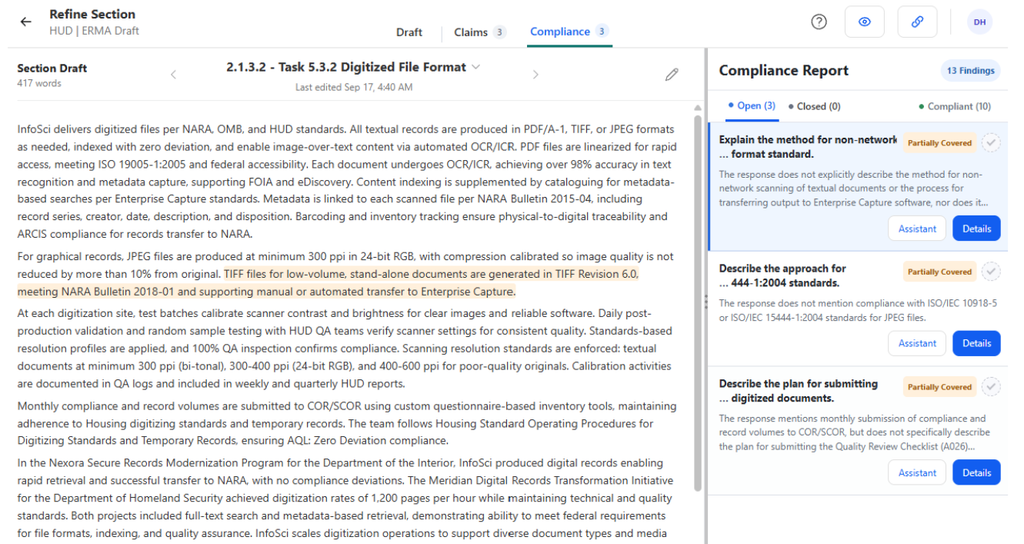
- Review the finding details: Clicking on each finding allows the user to see all the details. The specific section text is highlighted so users know exactly where to look, and the exact details on why pWin.ai determined there is a gap are shown to the user for review and validation.
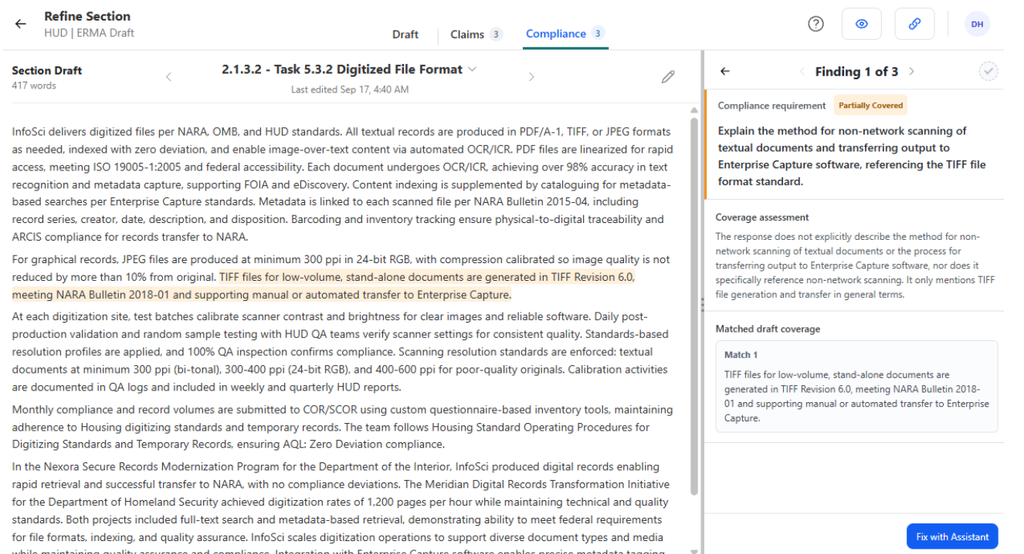
- Remediate issues quickly with AI: With the click of a button, users can ask the pWin.ai Assistant to propose a remediation to the compliance gap. The pWin.ai Assistant understands the requirement, the current proposal text, and the compliance finding details. The pWin.ai Assistant then proposes text changes for the user to review. You accept or reject the proposed remediation, or keep iterating in chat until the section is right for you.
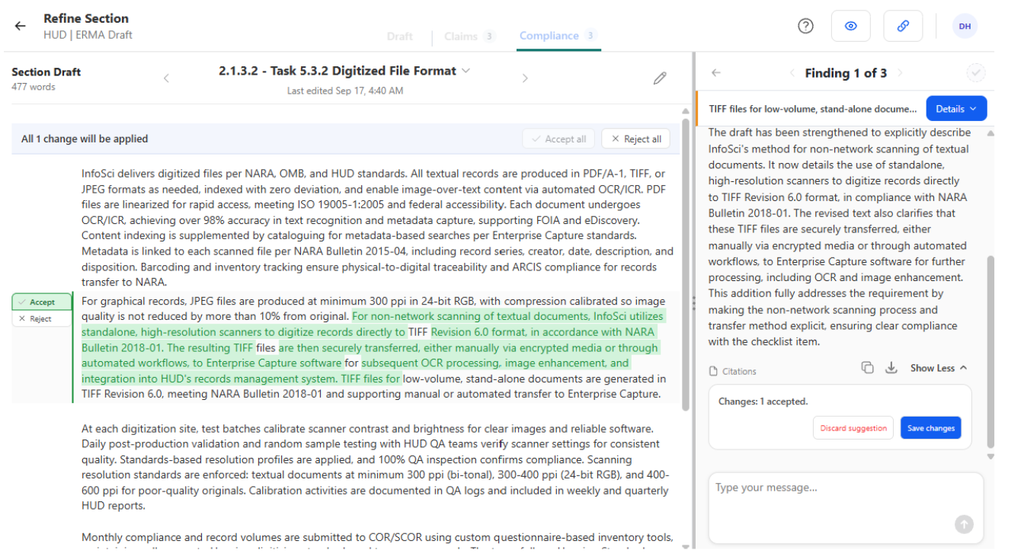
- Track gaps to closure: Findings can be moved from an open state to a closed state by the user once properly remediated. This makes it easy to see which gaps still exist and which have been handled.
Why This Is Powerful
It’s probably obvious why this is so powerful but let’s hit on a few of them:
- Compliance findings are now directly integrated. Placing the compliance report findings right beside the proposal draft text makes it easier to review and understand.
- Compliance remediation is easily manageable. Tracking, solving, and moving each compliance finding from open to closed makes the challenging task of managing compliance simpler.
- AI fixes gaps with precision. The pWin.ai Assistant understands the full context of the compliance finding so it suggests text changes that are specifically targeted to resolve the compliance gap.
- Human ownership and control remain. The user is always in control across the pWin.ai platform and that is true with the Compliance Remediation Tracker feature. pWin.ai will not do anything without the user’s consent.
How Each Role Uses It
Proposal Manager: Knowing Where Things Stand
You need to know how much work remains and now you can track the number of open items.
Open the Proposal Draft and see how many open compliance items remain. Assign each section to the appropriate owner in the proposal project and send them a notification with a link directly to the section they need to review. As compliance findings close, you see progress in real-time.
Proposal Writer: Quickly Closing Gaps
So many compliance gaps, so little time. Now you can remediate quicker than ever.
Open each compliance finding, see the highlighted proposal text, review the reason for the gap, then use the pWin.ai Assistant to fix it in seconds. Because the pWin.ai Assistant already has the context, you get a smart suggestion that actually helps.
Compliance Reviewer: Running a Sharper Color Team
Pink and Red Team reviews are time-boxed, and most of that time gets spent locating things.
Review a stronger draft. Come in with the findings already available for your review. Or kick off another analysis. Get laser-focused on what’s most important for your review.
AI That Actually Helps
Proposal software is only worth using if it actually saves time and produces compliant and compelling proposals that win. Most AI tools fall very short. By bringing Compliance reviews and remediation into the proposal drafting experience, pWin.ai lives up to the promise of AI that actually helps.
If you would like to see how pWin.ai handles Compliance inside a live draft, request a demo at pwin.ai