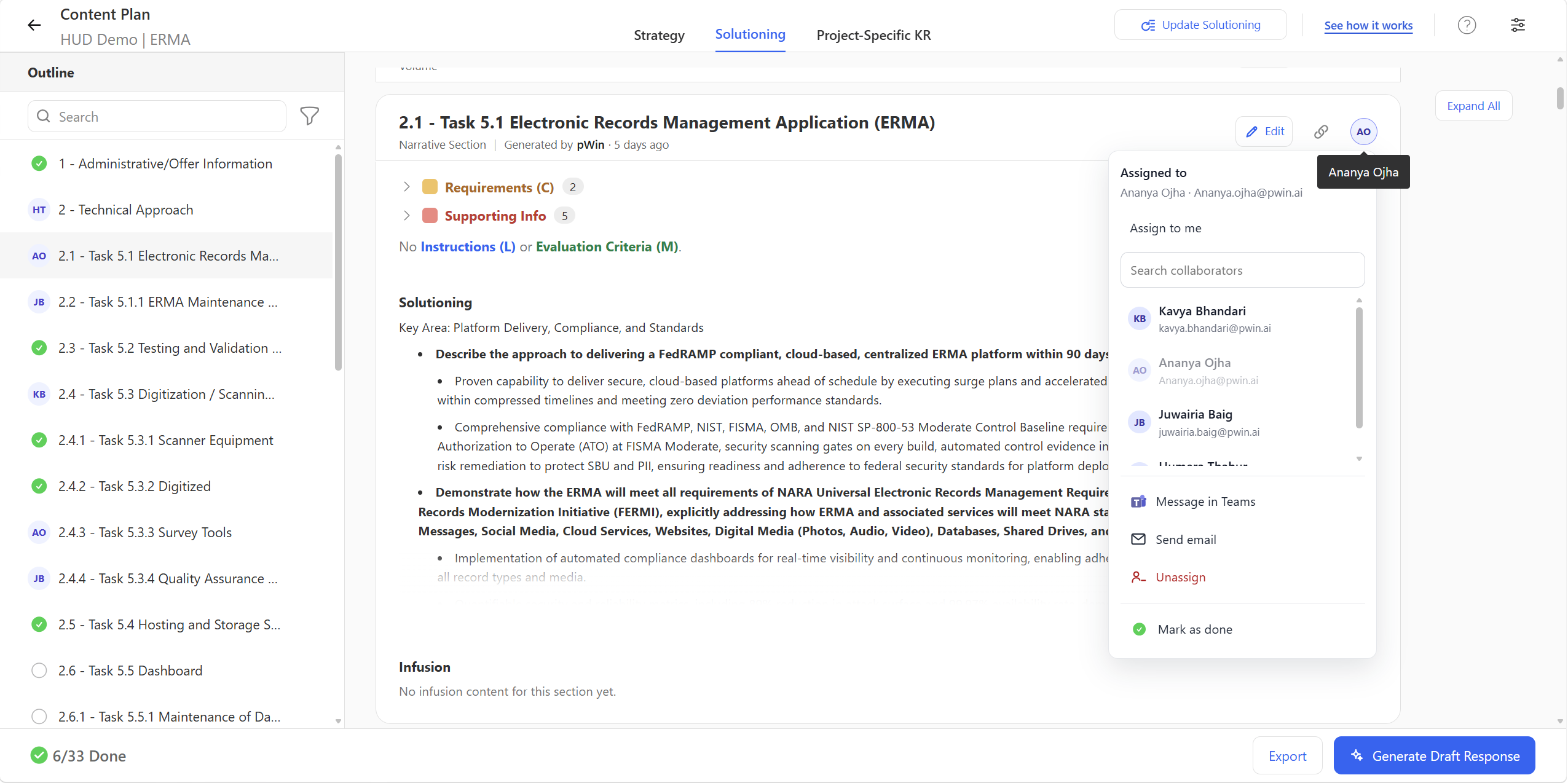
Task Assignments let Proposal Managers assign specific proposal sections to SMEs, writers, reviewers, and refinement collaborators during Content Plan Solutioning and Draft Refinement. Assigned contributors get a notification with a direct link to their section. Dashboard and needs-attention views show what is owned, what is in progress, and what is overdue. Combined with multi-user collaboration, section-level edit locks, and version history, it moves proposal coordination out of spreadsheets and into the proposal itself.
The Tracker Is Always Out of Date
Every proposal team has one. A spreadsheet, a PowerPoint status slide, an action-item doc, or some combination of all three. It lists sections, owners, and due dates. It is accurate for about four hours after the status meeting.
The problem is not the tracker. It is that the tracker lives somewhere the work does not. Assignments sit in one file while the content sits in the platform, and keeping the two aligned becomes a job in itself. Proposal Managers end up spending their time collecting status rather than advancing the proposal, and contributors end up asking a version of the same question over and over: what am I supposed to be working on?
Task Assignments close that gap by attaching ownership directly to the section being developed.
What Are Task Assignments in pWin.ai?
Proposal Chat is a conversational assistant embedded directly in each pWin.ai Proposal project. It has access to four things at once:
- The solicitation package, including every RFx document loaded into the project
- Connected Knowledge Repositories, holding past proposals, capabilities content, CPARS, resumes, and capture artifacts
- Project-specific content uploaded to that proposal
- Proposal and project context, so you can ask about status and stage, not just document contents
Task Assignments are section-level ownership built into the pWin.ai proposal workflow. A Proposal Manager assigns a specific proposal section to a specific person, that person gets notified with a link that takes them straight to it, and the assignment stays visible to everyone who needs to see it.
How Does It Work?
Assigning the work
During Content Plan Solutioning, the Proposal Manager turns the plan into named ownership. A technical SME takes the technical approach section. Someone else takes past performance support. Someone else takes management content. This happens before draft development, so the plan and the people are aligned from the start rather than reconciled later.
Notifying the contributor
When a section is assigned, the collaborator can receive a notification through supported email or Microsoft Teams experiences, with a direct link to that section’s screen. The Proposal Manager does not have to send a separate message explaining what is needed and where to find it. The link does that work.
Working the section
Contributors land on their assigned section with the dedicated Solutioning and Refinement assistants available and the supporting compliance inputs for that section alongside them. They can do focused work without navigating the full proposal or understanding every prior workflow step.
Keeping people out of each other’s way
Task Assignments run alongside multi-user collaboration. Several contributors can work across the same proposal at once, with section-specific edit locks preventing anyone from overwriting anyone else. Version history and edit information show who changed what, with the ability to compare changes or restore an earlier version.
Seeing where things stand
Assignments feed the proposal dashboard and needs-attention views. Contributors can see what is assigned to them. Proposal Managers can see progress, outstanding work, and overdue items.
Why Task Assignments Matter
Coordination happens where the work happens. Ownership lives on the section, not in a separate file that has to be maintained by hand.
Every contributor gets clear direction. SMEs, writers, reviewers, and refinement collaborators can see exactly where their expertise is needed instead of inferring it from an email thread.
Accountability becomes visible. Making ownership explicit removes the ambiguity about who is responsible for completing, reviewing, or refining each section.
Status chasing goes down. Follow-up messages and recurring meetings held only to determine whether work has started become largely unnecessary.
SMEs get a cleaner entry point. Your best technical people do not need to learn the proposal lifecycle. They need to be pointed at the section where their knowledge matters. This is the difference between an SME who contributes and an SME who keeps postponing.
Distributed teams stay coordinated. Contributors working across functions, locations, and time zones share one view of ownership.
Collaboration scales without fragmenting. More people can contribute at the same time without the proposal turning into a set of disconnected individual efforts, because the Proposal Manager keeps project-level control over the proposal, outline, and compliance throughout.ng it into an unrelated stage. Load the supporting documents into the project, ask what you need, and get a cited answer. The structured workflow is still there when you need it. This is the release valve for everything around it.
How Each Role Uses Task Assignments
Proposal Manager: Turning a Plan Into Owned Work
You have a Content Plan and a team. Your job is connecting them and then knowing, at any moment, where the proposal actually stands.
Assign each major section to the appropriate SME, writer, or volume lead as solutioning begins. During Draft Refinement, assign the sections that need more work, whether that is additional content, SME validation, or a compliance pass. Use the dashboard to see which sections are still waiting on input and which assignments have gone overdue, then follow up on the specific ones that need it rather than sending a broadcast update request to everyone.
The practical change is that you stop maintaining a parallel assignment spreadsheet, and you stop asking contributors to navigate the full proposal to find their piece of it.
Subject Matter Expert: Contributing Without Learning the Whole Process
You are being pulled into a proposal because you know one thing well. You do not want a walkthrough of the proposal lifecycle.
You get a notification saying your expertise is needed, with a link. You open the assigned section, see the solutioning inputs and compliance requirements that apply to it, and strengthen the proposed solution with what you actually know. If a draft has already been generated, you validate whether it is technically accurate in your domain. Then you are done. No participation in every workflow step, no sitting through status calls for sections you have nothing to do with.
Writer: Knowing What to Work On Next
You want a queue, not a meeting.
Open your assignments and see which sections have come to you for drafting or refinement. Work from the proposal strategy, compliance requirements, and supporting knowledge already attached to those sections. Check edit history to understand what previous contributors changed and why, so you are refining rather than relitigating. When a section is done, it moves on visibly instead of sitting in someone’s inbox.
Volume Lead: Keeping a Volume Moving
You own a volume with multiple contributors inside it, and you need to know whether it is progressing without micromanaging each person.
Assign sections within your volume to the right contributors. Watch which ones are progressing and which are waiting on SME input, review, or refinement. Because several people can work inside the same volume at once with section-level ownership held clear, you get parallel progress without collisions.
Proposal Reviewer: Review as an Assigned Task
Review work often arrives informally, which is why it slips.
Instead, you receive assignments for the sections requiring compliance, quality, or editorial review. You can see what has been assigned to you and what still needs attention. Edit history tells you who changed what since your last look. When a section is not ready, you assign it back for further refinement rather than writing a note about it and hoping someone acts.
Refinement Collaborator: Targeted Access, Limited Scope
Some contributors should improve specific draft content without owning the strategy or compliance model behind it.
A direct link brings you to the section requiring refinement. You improve the draft while working alongside others, with clear section-level responsibility and no need for full context on the entire proposal. You can also chat with project-specific Knowledge Repository content to find the supporting material you need.
Conclusion
Proposal development is a distributed team effort, and most of the friction in it comes from ownership living somewhere other than the content. Task Assignments put the two together. Contributors know where to engage, Proposal Managers can see progress and blockers without collecting them by hand, and the hours that went into maintaining trackers and chasing updates go back into the proposal.
It is worth being clear about scope: this coordinates proposal work, and it is not meant to replace an enterprise project-management platform. Assignment status is most useful when your team keeps its work inside the pWin.ai workflow, and edit history gives visibility into changes without standing in for your organization’s formal approval process.
If you would like to see how Task Assignments and multi-user collaboration work inside a live proposal, request a demo at pwin.ai.