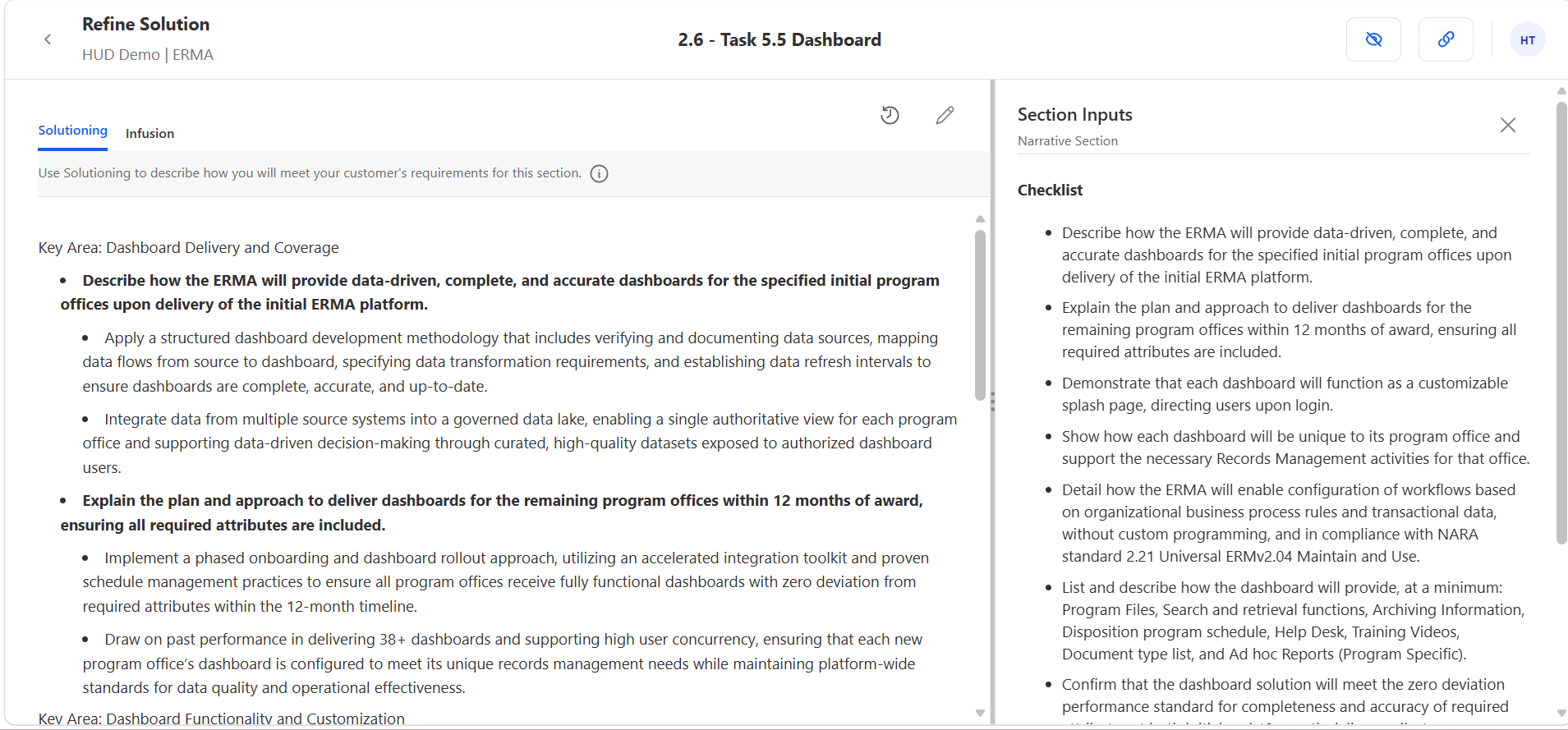
pWin.ai’s Content Plan Solutioning Assistant is an AI assistant built into section-level Solutioning of pWin.ai’s proposals workflow. It works with the current section solution, the compliance mappings and checklist for that section, your proposal strategy, and your selected Knowledge Repositories. You can ask it to find gaps, check win theme alignment, pull in capabilities and proof points, restructure solution points, or build a solution from scratch. Every change it proposes requires your approval, and approved edits create a new version you can restore.
Draft Quality Is Decided Before Anyone Writes
A generic draft is almost never a writing problem. It is a solutioning problem that showed up later.
If the section solution says your approach is “a proven, repeatable methodology,” the draft will say something similar at greater length. Adding words does not add substance. The point where a section becomes specific, evaluable, and differentiated is the point where the solution is developed, which happens before draft generation, and until now that stage did not have an assistant.
pWin.ai already generates a solution for each section grounded in your Knowledge Repository. The Solutioning Assistant is how your team makes that solution better before it turns into narrative.
What Is the Content Plan Solutioning Assistant?
It is a conversational assistant embedded inside the section-level Solutioning experience. You select a section, open the detailed Solutioning view, and the current solution sits next to the assistant. You can review, question, and improve it without moving to another screen.
The assistant works with the context that section already has:
- The current section solution, meaning the latest solution points generated or edited for that section
- Compliance mappings, covering the solicitation requirements, instructions, and evaluation criteria mapped to the section
- The compliance checklist, a distilled list of what the section has to address, viewable in the Section Inputs panel while you work
- Proposal strategy, including customer pain points, win themes, differentiators, and competitive strategy
- Selected Knowledge Repositories, limited to the Shared KRs configured for that Proposal project
- The project-specific Knowledge Repository, where SMEs can upload opportunity-specific solution documents and supporting material
- Section Infusion, which the assistant can read as context but does not edit, since Infusion remains a separate manual input
Improving a section solution normally means holding the requirement, the strategy, and your company’s capabilities in your head at the same time. The assistant holds them for you.
How it Helps Write a Stronger Proposal Section
You ask, it proposes, you decide.
Ask. Questions can be diagnostic or generative. A few of the things you can ask for:
- Explain the current solution in simpler terms
- Identify the areas that need more detail
- Check whether the solution addresses the section’s compliance checklist
- Strengthen alignment with the proposal’s win themes
- Add relevant capabilities or methodologies from the available Knowledge Repositories
- Reorganize the solution points for clarity
- Suggest a more specific implementation approach
- Develop a solution from scratch when none exists or the current approach is not working
- Improve the direction the eventual writer will receive
Built-in prompts cover the common ones: explain the current solution, check alignment with the win strategy, and generate a section solution from scratch.
Propose. The assistant does not silently overwrite your solution. It proposes changes and shows them to you. Show Thinking is available while it works, so you can see how it approached the request.
Decide. You approve or reject. Approving creates a new solutioning version, with details showing when the solution changed and who changed it. If a later change does not work out, you restore the earlier version.
Why It Matters
Better solutions produce better first drafts. A complete, specific solution gives the writing engine and your proposal writers real direction. Generic in, generic out applies here more than anywhere else in the process.
Requirements stay in view while you improve the approach. The compliance checklist sits beside the solution, so you can see what the section has to cover while you work on how it will cover it.
Strategy connects to individual sections. You can ask directly whether a solution reflects the pain points, differentiators, and win themes you set at the proposal level, instead of treating strategy as a planning artifact that gets consulted once and then forgotten.
Enterprise knowledge becomes easier to apply. Asking whether your company has a relevant capability, and having the answer pulled from your selected repositories, is faster than searching each source before you can update the solution.
SMEs contribute where they matter. An SME can open one section, understand what the customer requires, add the technical detail that only they have, and leave. That is a far smaller ask than participating in the full proposal process.
You stay in control. Nothing changes without approval, and version history protects the work you have already done.
How Each Role Uses the Solutioning Assistant
Proposal Manager: Raising the Floor Before Handoff
You are looking at a generated solution that is fine but not sharp, and you have to decide whether to send it to a writer as is.
Ask the assistant which compliance checklist items are not sufficiently addressed, then ask whether the solution actually supports your win themes. If the approach is too generic, ask for a new solution built from a different angle. Strengthen it before assigning the section, so the SME or writer inherits something worth building on rather than something they have to rescue. Review and approve the proposed changes so you know exactly what went into the version the team will work from.
Subject Matter Expert: Adding the Detail Only You Have
You have been pointed at one section. The generated solution captures the general shape of the work but not how it is actually done.
Start by asking what the customer requires for this section, so you are not reading the whole solicitation. Then add technical depth to the high-level solution, ask the assistant to bring in a specific methodology or proof points from the project’s Knowledge Repository, and confirm whether the company has a documented capability relevant to a requirement you are unsure about. Finish by restructuring the solution so the writer who picks it up receives clear direction instead of a list of technical fragments.
Volume Lead: Consistency Across a Volume
You want a queue, not a meeting.
Open your assignments and see which sections have come to you for drafting or refinement. Work from the proposal strategy, compliance requirements, and supporting knowledge already attached to those sections. Check edit history to understand what previous contributors changed and why, so you are refining rather than relitigating. When a section is done, it moves on visibly instead of sitting in someone’s inbox.
Volume Lead: Keeping a Volume Moving
Individual sections can each look reasonable while the volume as a whole reads as disconnected.
Review each section solution for consistency with the broader volume strategy. Ask whether the important evaluation factors are reflected in the approach and whether the solution connects to the differentiators you are competing on. Improve the sequence and completeness of the solution points so sections build on each other rather than repeating each other.
Proposal Writer: Understanding the Intent Before Drafting
You have a section solution and a deadline, and you would rather not guess at the reasoning behind it.
Ask the assistant to explain the intent behind the solution. Ask which proof points, methods, and outcomes the narrative should emphasize, and how each solution point connects to the compliance checklist. You end up drafting against direction you understand, which is the difference between writing a section and reverse-engineering one.
Proposal Reviewer: Catching Problems While They Are Cheap
Reviewing solutioning is far less expensive than reviewing a draft built on flawed solutioning.
Ask whether the solution looks complete before the team invests drafting hours in it. Ask the assistant to identify areas that are unclear or insufficiently supported, compare the solution against the section requirements and proposal strategy, and recommend where additional SME input is needed before the response moves forward.
Conclusion
The Solutioning Assistant puts AI help at the stage where it changes the most: while the approach is still being decided, not after it has been written up. Your team clarifies what a section needs to accomplish, fills the gaps, connects the strategy to the specifics, and hands writers direction worth following. You approve every change, and you can restore any earlier version.
If you would like to see how the Solutioning Assistant strengthens a section before drafting begins, request a demo at pwin.ai.