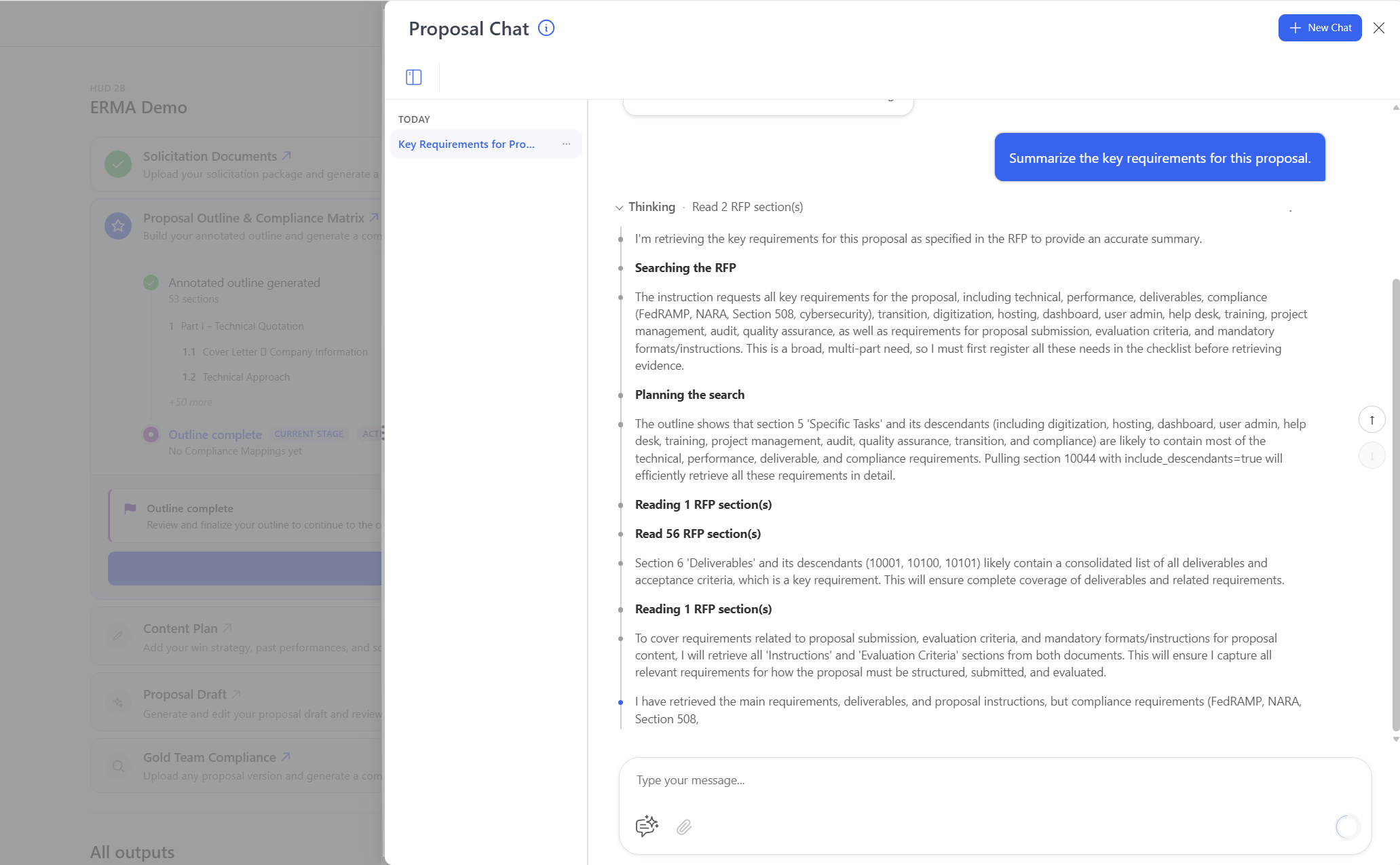
Proposal Chat is an AI assistant built into every pWin.ai Proposal project. It answers questions about the solicitation, your connected Knowledge Repositories, and the proposal itself, with citations down to the excerpt and page. It is available the moment solicitation documents are uploaded, so your team can analyze requirements, assess fit, and locate past performance while the platform is still building other project assets.
The First Week of a Proposal Is Usually Spent Looking Things Up
Most proposal teams lose their first days to searching. Someone reads Section L to pull submission instructions. Someone else cross-references Section M against the SOW. A third person digs through old proposals to find a past performance example that matches a specific requirement. None of that work is strategy. It is retrieval, and it happens across hundreds of pages and several disconnected systems before the real thinking starts.
Proposal Chat removes that gap. It turns your solicitation package and connected knowledge sources into something you can ask questions of, inside the project where the proposal is being built.
What Is Proposal Chat?
Proposal Chat is a conversational assistant embedded directly in each pWin.ai Proposal project. It has access to four things at once:
- The solicitation package, including every RFx document loaded into the project
- Connected Knowledge Repositories, holding past proposals, capabilities content, CPARS, resumes, and capture artifacts
- Project-specific content uploaded to that proposal
- Proposal and project context, so you can ask about status and stage, not just document contents
That last point is what separates it from a general-purpose chatbot pointed at a PDF. Proposal Chat knows which proposal you are working on.
How Does Proposal Chat Work?
You open Proposal Chat from inside the Proposal project and ask a question in plain language. The assistant answers from the project’s available source content, then shows you where the answer came from.
A few things make the experience different from document search:
- Cross-document analysis. It can identify, compare, and synthesize information that appears across multiple solicitation documents rather than returning one passage from one file.
- Excerpt and page-level citations. Every answer traces back to the supporting content, so you can verify before you act.
- Show Thinking. You can see how the assistant approached the request, which matters when the answer will inform a bid decision or a compliance mapping.
- Prompt templates and your Shared Prompt library. Common proposal questions are already built, and your team’s own prompts are available to everyone working the bid.
- Word export. Chat outputs download as Word documents, so analysis can move into your existing review process.
Follow-up questions build on the same conversation, so an initial read of the solicitation can develop into a full requirements analysis without starting over.
Where Proposal Chat Fits in Your Workflow
Proposal Chat is available as soon as solicitation documents are in the project. You do not have to wait for the Annotated Outline, compliance mappings, or other assets to finish generating. While pWin.ai prepares those, your team can already be working.
That changes the shape of the early proposal week. Instead of waiting on the workflow, you use the waiting time to answer the questions that determine whether the bid is worth pursuing and how it should be shaped.
It also supports work at every later stage: requirement discovery, submission and evaluation analysis, capability and past performance research, outline and compliance validation, content development, and ad hoc analysis that does not map neatly to a formal workflow step.
Why Proposal Chat Matters
You start earlier. Analysis begins on Day 0, when the RFx arrives, rather than after setup is complete.
You find what is buried. Hidden requirements, evaluation criteria, submission instructions, and compliance references surface without a manual page-by-page review, using the same RFP parsing that powers the rest of the platform.
Requirements connect to institutional knowledge. You can ask whether your organization has relevant capabilities or past performance for a given requirement, and get an answer drawn from your repositories instead of from memory.
Decisions come earlier and cost less. Opportunity fit, capability gaps, partner needs, and proposal risk can all be explored before you commit a full team to the effort.
Occasional contributors can participate. A subcontractor or an SME responsible for one section can begin with a question rather than learning an entire workflow first.
Answers are traceable. Citations and Show Thinking give reviewers a defensible basis for using AI output in a high-stakes bid. Evidence you can point to is what makes AI usable in federal work.
How Proposal Chat Fits Your Role
Proposal Chat is useful to different people for different reasons. Here is what that looks like in practice.
Proposal Manager: Understanding the Bid Before Committing the Team
You get the RFx on a Friday afternoon and the kickoff is Monday. Before you can staff anything, you need to know what the customer is actually asking for and what the submission will demand.
Open Proposal Chat and ask:
- “What are the primary evaluation factors, and how will the response be scored?”
- “List every submission requirement, including page limits, font requirements, file formats, and the deadline.”
- “What are the mandatory response elements, and where does each one appear?”
- “Where do Sections L and M contradict each other or the SOW?”
You get answers with page-level citations, so you can verify anything that will drive a staffing or schedule decision. From there you can ask for an early read on fit, check the proposal’s current stage and project context, and flag risks worth raising at kickoff. That work happens in the first hour instead of the first week.
Capture or Opportunity Team: Deciding Whether to Bid
Your question is not how to write the proposal. It is whether to write it at all.
Ask Proposal Chat to summarize the opportunity, then push into the fit question:
- “Compare the technical requirements in this solicitation against our documented capabilities.”
- “Do we have past performance on contracts of similar scope, size, and agency?”
- “Which requirements do we have no evidence to support?”
- “What does the solicitation reveal about the customer’s priorities and current pain points?”
Because Proposal Chat reaches your connected Knowledge Repositories, the gap analysis comes from what your organization has actually documented, not from what someone remembers. That tells you where you are strong, where you need a partner, and which win themes have real evidence behind them. Combined with the Solicitation Readiness Score, you walk into the bid/no-bid decision with a defensible position rather than a hunch.
Volume Lead: Building a Section That Answers the Right Requirements
You own a volume. Your problem is making sure nothing that belongs in it lands somewhere else, and nothing lands in it twice.
- “Which requirements across all RFx documents apply to the Management Volume?”
- “Find every mention of transition or phase-in across the solicitation, including attachments and amendments.”
- “Show me the source language behind the compliance mapping for section 3.2.”
- “What evaluation language should shape how we write this volume?”
The cross-document analysis matters most here. Requirements rarely live in one place. A staffing obligation can appear in the SOW, get restated in Section L, and get scored differently in Section M. Proposal Chat pulls those together so you can build against the full picture, and the citations let you check the mapping instead of trusting it.
SME or Writer: Getting Unblocked Without Leaving the Proposal
You have been asked to write about one technical area. You do not know the whole solicitation and you should not have to read it.
- “What exactly does the customer require for cybersecurity monitoring, and what standards apply?”
- “Find past performance examples where we delivered continuous monitoring for a federal civilian agency.”
- “What metrics or outcomes do we have documented for this capability?”
- “What win theme and discriminator apply to this section, and what proof supports them?”
Instead of searching each repository separately or asking three colleagues, you get the requirement, the supporting evidence, and the strategic direction in one conversation. Because answers cite their sources, you can pull the proof point knowing where it came from and whether it is recent enough to use. You can also download the output as a Word document and work from it directly.
Proposal Reviewer: Checking the Work Before It Goes Out
Review time is short and your job is to find what is missing or unsupported.
- “Which Section M evaluation factors are not addressed anywhere in the draft?”
- “Where did this claim about our surge capacity come from?”
- “Are there inconsistencies between the technical approach and the staffing described in the management volume?”
- “Show me the solicitation language behind this requirement.”
Cited answers give you something to point to in the review, which changes the conversation from opinion to evidence. Show Thinking adds another layer: you can see how the assistant reached the answer before you act on it. That matters when a reviewer’s finding will send a writer back for a rewrite.
Specialized Contributors: Work That Does Not Fit a Workflow Step
Not every proposal task maps to a formal stage. Pricing analysts have assumptions to check. Someone needs to review a document that was added to the project but has no dedicated step in the standard workflow. Someone else has a one-off question that does not justify opening a new process.
Proposal Chat handles that work without forcing it into an unrelated stage. Load the supporting documents into the project, ask what you need, and get a cited answer. The structured workflow is still there when you need it. This is the release valve for everything around it.
Conclusion
Proposal Chat makes a Proposal project something your team can interrogate from the first hour, not a folder of documents waiting on process. The time you would have spent locating information goes instead to interpreting requirements, testing fit, and building a stronger response.
If you would like to see how Proposal Chat gives your team answers from Day 0 of a pursuit, request a demo at pwin.ai.